Enterprise AI
Can AI Integrate With Your Existing ERP, CRM or Accounting System?
How AI connects to the systems you already run — and when replacement is the wrong conversation.
14 Aug 20268 min read
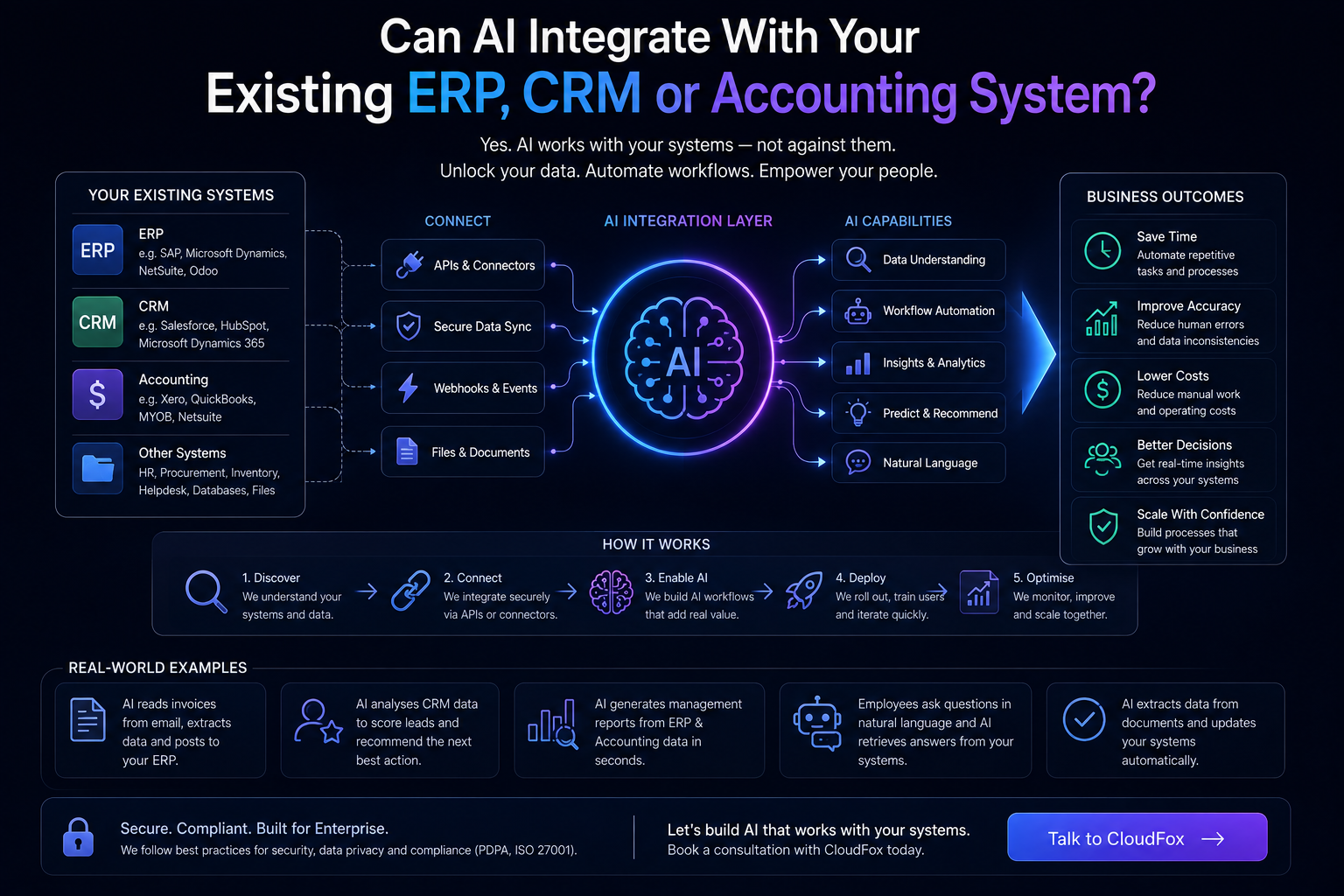
A common fear around AI projects is that they require ripping out ERP, CRM or accounting platforms. In practice, many valuable deployments do the opposite: they sit beside trusted systems and move information in and out through controlled integrations.
What “AI integration” usually means
It means automation or AI-assisted steps can read from or write to systems of record — creating tickets, updating customer fields, posting drafted entries for approval, or retrieving context needed to complete a task. The ERP or CRM remains the backbone.
Common integration patterns
APIs
When platforms expose stable APIs, AI workflows can exchange data programmatically. This is often the cleanest path for production use.
Workflow and integration layers
Middleware, iPaaS tools or custom integration services orchestrate steps across multiple systems — useful when several applications must stay in sync.
Event-driven updates
A new email, form submission or document upload triggers a workflow that enriches data and proposes updates back to CRM or ERP.
What you usually do not need to do first
- Replace a stable accounting system just to “add AI”
- Migrate every historical record before a pilot
- Build a universal enterprise AI platform on day one
Constraints that affect feasibility
Legacy systems without APIs, strict change windows, unclear data ownership and weak staging environments all increase effort. So do processes that require dual entry today — integration design must remove duplication, not automate both sides of it.
CloudFox typically evaluates whether AI automation should extend current platforms or whether parts of the workflow need digitalisation or custom software first.
Governance still applies at the boundary
Writing into finance or customer systems should be deliberate. Many designs draft updates for human approval, log changes, and limit which fields automation may touch. Integration without controls is just faster mistakes.
A practical discovery checklist
- Which system is the source of truth for each field?
- What can be read automatically versus written automatically?
- Where is human approval mandatory?
- How will failures and retries be handled?
- Who owns the integration after go-live?
If you want AI to work with your existing ERP, CRM or accounting stack, tell us which systems and workflows are in play Talk to CloudFox.